What is the process for connecting to the data base from the application in weblogic?
1. Generic Data Source Modules
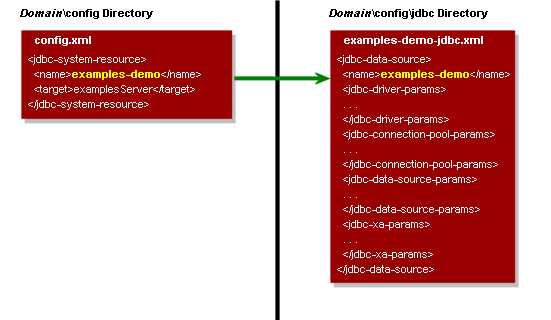
Description of ''Figure 1-1 Reference from config.xml to a Data Source System Module''
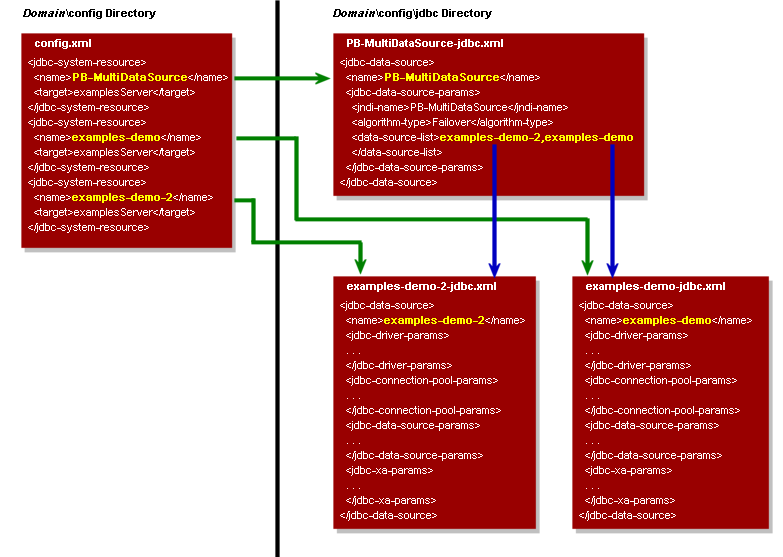
Description of ''Figure 1.3 Reference from config.xml to Multi Data Source and Data Source System Modules''
1. Generic Data Source Modules
Generic data source system modules are included in the domain's
config.xml file as a JDBCSystemResource element, which includes the name of the JDBC module file and the list of target servers and clusters on which the module is deployed. Figure 2-1 shows an example of a data source listing in a config.xml file and the module that it maps to.
Note:
"Generic" is the term used to distinguish a simple data source from a multi data source or AGL data source.
Figure 1-1 Reference from config.xml to a Data Source System Module
Description of ''Figure 1-1 Reference from config.xml to a Data Source System Module''
In this illustration, the
config.xml file lists the examples-demo data source as a jdbc-system-resource element, which maps to the examples-demo-jdbc.xml module in the domain\config\jdbc folder.2. Active GridLink Data Source System Modules
AGL data source system modules are included in the domain's
config.xml file as a JDBCSystemResource element, similar to generic data source system modules. AGL data sources include an jdbc-oracle-params section that includes ONS and FAN.
A single AGL data source provides connectivity between WebLogic Server and an Oracle Database service, which may include one or more Oracle RAC clusters. An Oracle Database service represents a workload with common attributes that enables administrators to manage the workload as a single entity. You scale the number of AGL data sources as the number of services increases in the data base, independent of the number of nodes in the Oracle RAC cluster(s). Examples of High Availability support for multiple clusters include Data Guard, GoldenGate, and Global Database Service.
Note:
Active GridLink and Multi Data Source are designed to work with Oracle RAC clusters. Oracle does not recommend using generic data sources with Oracle RAC clusters. 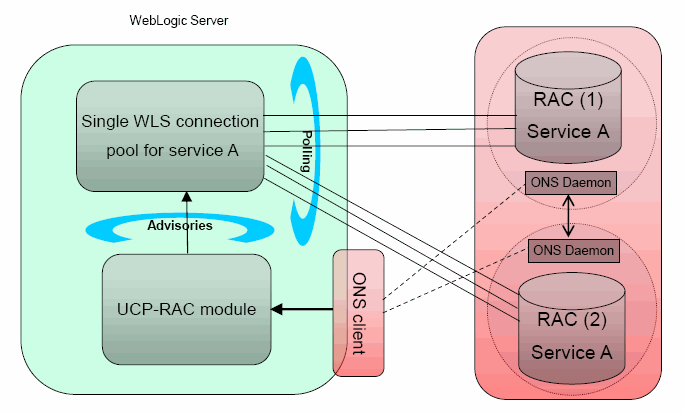
3. Multi Data Source System Modules
Similarly, multi data source system modules are included in the domain's
config.xml file as a jdbc-system-resource element. The multi data source module includes a data-source-list parameter that maps to the data source modules used by the multi data source. The individual data source modules are also included in the config.xml. Figure 2-2 shows the relationship between elements in the config.xml file and the system modules in the config/jdbc directory.Description of ''Figure 1.3 Reference from config.xml to Multi Data Source and Data Source System Modules''
In this illustration, the
config.xml file lists three JDBC modules—one multi data source and the two generic data sources used by the multi data source, which are also listed within the multi data source module. Your application can look up any of these modules on the JNDI tree and request a database connection. If you look up the multi data source, the multi data source determines which of the generic data sources to use to supply the database connection, depending on the data sources in the data-source-list parameter, the order in which the data sources are listed, and the algorithm specified in the algorithm-type parameter.
Note:
Members of a multi data source must be generic data sources; they cannot be multi data sources or AGL data sources.

No comments:
Post a Comment